
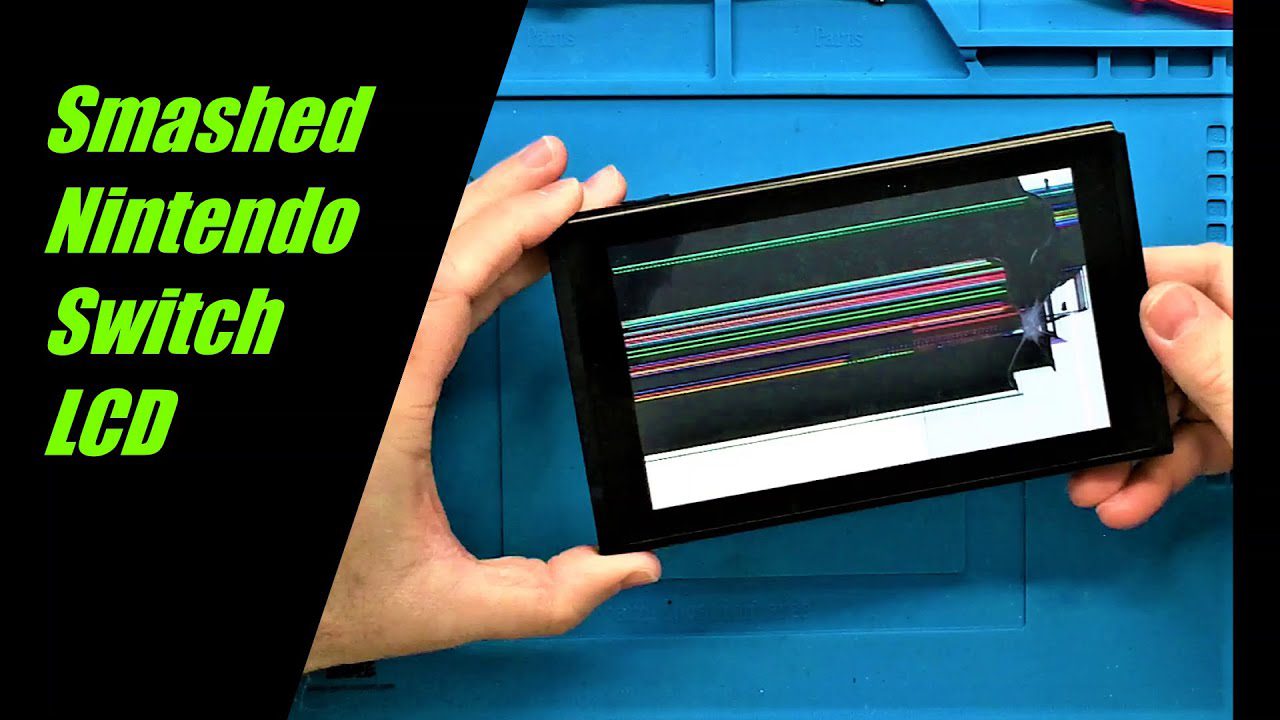
Cracked Nintendo Switch screen? Whether it’s a minor crack or shattered display, don’t let it ruin your gaming experience. Here’s everything you need to know about Nintendo Switch screen replacement in Singapore—including costs, repair time, and how to prevent future damage.

Nintendo Switch Screen Types & Damage
Understanding your Switch model and damage type helps estimate repair costs accurately.
Switch Model Screens:
- Nintendo Switch (Original): 6.2-inch LCD capacitive touchscreen
- Nintendo Switch Lite: 5.5-inch LCD capacitive touchscreen
- Nintendo Switch OLED: 7-inch OLED capacitive touchscreen (most expensive)
Common Screen Damage Types:
1. Cracked Glass (Touch Still Works):
- Surface cracks or spider web patterns
- Display image still clear
- Touch functionality works fine
- Cheapest to fix: S$80-100
2. Shattered Screen (Touch Unresponsive):
- Deep cracks across display
- Touch not working in areas
- May have dead spots
- Requires full digitizer: S$100-130
3. LCD Damage (Display Issues):
- Black spots or lines on screen
- Discoloration or bleeding
- Dead pixels
- Flickering or ghosting
- Full LCD replacement: S$120-150
4. OLED Screen Damage (Switch OLED):
- Burn-in or permanent image retention
- Color banding
- Dead pixels more visible
- Most expensive: S$150-200
Important: If your screen has just minor surface scratches (not cracks), you don’t need replacement—just apply a tempered glass screen protector. It’ll cost S$10-20 and make scratches invisible!
Switch Screen Replacement Costs in Singapore (2026)
Transparent pricing is crucial when choosing a repair shop. Here’s what you should expect:
BreakFixNow Pricing:
- Nintendo Switch LCD: S$80-120
- Nintendo Switch Lite LCD: S$90-130
- Nintendo Switch OLED Screen: S$150-200
- Glass-only replacement: S$80-100 (if LCD intact)
- Free diagnostic (15 minutes)
- 90-day warranty on all repairs
Nintendo Official Service:
- Out of warranty: S$160-280
- With warranty: S$48-88 (accidental damage fee)
- Wait time: 2-4 weeks
- Must ship to service center
Other Repair Shops:
- S$90-150 for standard Switch
- S$170-220 for OLED model
- Prices vary by parts quality
DIY Replacement Kits:
- LCD screen kit: S$50-80 (from Shopee/Lazada)
- OLED screen kit: S$120-160
- Risk: High—can damage ribbon cables or motherboard
- Not recommended unless experienced
According to iFixit’s Switch repairability score, screen replacement is moderately difficult (6/10 difficulty) due to delicate ribbon cables and adhesive.
Professional Screen Replacement Process
At BreakFixNow, we follow a meticulous process for Nintendo Switch screen repair:
Step-by-Step Repair:
- Free Diagnosis (10-15 min): Inspect damage type, test touch functionality
- Quote Approval: Provide transparent pricing before starting work
- Disassembly (15 min): Carefully remove back cover and components
- Screen Removal (20 min): Disconnect ribbon cables, remove adhesive
- Installation (20 min): Install new screen, reconnect all cables
- Reassembly (15 min): Secure components, apply new adhesive
- Quality Testing (10 min): Test touch, display, buttons, Wi-Fi, sound
- Customer Test: You test before payment to ensure everything works
Total Repair Time: 60-90 minutes for most Switch models. Same-day service available at BreakFixNow.
What We Test After Replacement:
- ✓ Touch sensitivity (all areas)
- ✓ Display brightness and colors
- ✓ No dead pixels or lines
- ✓ Joy-Con connectivity
- ✓ Audio output
- ✓ Button functionality
- ✓ Game cartridge reader
- ✓ Wi-Fi and Bluetooth
DIY Screen Replacement vs. Professional Service
DIY Switch Screen Replacement:
- Cost: S$50-160 (parts only, from Shopee/Lazada)
- Time: 2-4 hours (first attempt)
- Risk: High—can damage ribbon cables, digitizer, or motherboard
- Tools needed: Tri-wing screwdriver, spudger, heat gun, adhesive
- Warranty: None if you damage other components
- Difficulty: 6/10 (moderate to difficult)
Common DIY Mistakes:
- Tearing fragile ribbon cables (S$50-80 extra to fix)
- Applying too much heat (melts plastic housing)
- Incorrect digitizer connection (touch won’t work)
- Damaging battery during disassembly (fire risk)
- Stripping tri-wing screws (can’t reassemble)
Professional Service (BreakFixNow):
- Cost: S$80-200 (parts + labor + warranty)
- Time: 60-90 minutes
- Risk: Minimal (experts handle delicate components)
- Warranty: 90 days on parts and labor
- Quality assurance: Tested before return
- Bonus: Free diagnostic, no-fix-no-fee policy
Verdict: Unless you’re experienced with electronics repair, professional service offers better value. The cost difference (S$30-50 more) gets you warranty, expertise, and peace of mind. One DIY mistake can cost more than professional repair!
After Screen Replacement: What to Check
Before Leaving the Repair Shop:
- Touch test: Open settings, swipe around, test all screen areas
- Visual check: Look for dead pixels, lines, or discoloration
- Brightness test: Adjust brightness slider, ensure it works
- Game test: Load a game, test touchscreen controls if applicable
- Joy-Con test: Attach/detach Joy-Cons, ensure they connect
- Audio test: Play video/game, check speakers work
- Button test: Press all buttons including volume, power, home
- Get warranty receipt: Keep this for 90-day warranty claims
First 24 Hours After Repair:
- Avoid pressure: Don’t press hard on new screen (adhesive curing)
- Wait before protector: Don’t apply screen protector yet (wait 24-48 hours)
- Test thoroughly: Play different games, test all features
- Report issues immediately: Any problems within warranty period
- Avoid water/liquids: Keep away from moisture while adhesive cures
How to Prevent Switch Screen Damage
Essential Protection Accessories:
- Tempered glass screen protector: S$10-20, absorbs impact before screen cracks
- Hard shell case: S$20-35, protects from drops and scratches
- Carrying case: S$15-30, essential for transport
- Docking station screen guard: S$8-15, prevents dock scratches
Daily Care Habits:
- Always use screen protector: Replace every 6-12 months
- Store in case: Never toss naked Switch in bag
- Avoid hard surfaces: Don’t place screen-down on tables
- Clean gently: Microfiber cloth only, no paper towels
- Secure grip: Use grip case or pop socket to prevent drops
Transportation Tips:
- Remove from bag carefully (don’t yank out)
- Don’t put heavy items on top in backpack
- Use padded section of bag
- Consider hard travel case for flights
Docking Safety:
- Insert Switch slowly into dock (don’t force)
- Use dock sock (fabric liner) to prevent scratches
- Check for debris in dock before inserting
- Consider third-party docks with softer rails
Singapore-Specific Tips:
- MRT protection: Hold firmly during crowded commutes
- Outdoor play: Avoid direct sunlight (screen glare + heat damage)
- Hawker centers: Keep away from food/drinks (liquid damage)
- Humidity: Store in dry, cool place (prevents screen adhesive degradation)
Common Screen Issues & Solutions
Screen Protector Bubbles:
- Not actual screen damage—just protector application issue
- Use credit card to push bubbles to edges
- If persist, remove protector and reapply fresh one
- Cost: S$10-20 for new protector (much cheaper than screen replacement!)
Screen Burn-in (OLED Model):
- Permanent image retention on OLED screens
- Caused by static images (game UI) displayed for hours
- Prevention: Lower brightness, enable auto-dim, vary games
- Fix: Screen replacement if severe (S$150-200)
Touchscreen Not Working After Drop:
- Digitizer ribbon cable may be disconnected
- Sometimes just loose connection (S$30-50 to reconnect)
- Other times requires full digitizer replacement (S$100-130)
Screen Flickering:
- Could be loose LCD connection or failing display
- First try: System Settings → TV Settings → Adjust Screen Colors (reset)
- If persist: Professional diagnosis needed
Does Warranty Cover Screen Damage?
Nintendo Official Warranty:
- Manufacturing defects: Covered (free repair)
- Accidental damage: NOT covered (must pay)
- Standard warranty: 12 months from purchase
- Extended warranty: Can purchase from retailers (S$50-100/year)
BreakFixNow Warranty:
- 90-day warranty on all screen replacements
- Covers: Defective screen, touch issues, dead pixels (not from new damage)
- Free replacement if screen fails within 90 days
- Excludes: New drops, liquid damage, or abuse after repair
Third-Party Insurance:
- Some electronics insurance covers accidental damage
- Cost: S$5-15/month (check if worthwhile)
- Usually has excess fee: S$30-80 per claim
Other Switch Repairs Often Needed With Screens
If your Switch was dropped hard enough to crack the screen, other components may be damaged too:
Frame/Housing Damage:
- Bent or cracked plastic housing
- Joy-Con rails damaged
- Cost: S$40-60 for housing replacement
Battery Damage:
- Battery may be punctured or swollen from drop impact
- Danger: Swollen battery can catch fire
- Cost: S$50-80 for battery replacement
Wi-Fi/Bluetooth Issues:
- Drop can disconnect antenna cables
- Simple reconnection: S$30-40
- Antenna replacement: S$50-70
Frequently Asked Questions
How long does Switch screen replacement take?
At BreakFixNow, Nintendo Switch screen replacement takes 60-90 minutes depending on the model. OLED screens take slightly longer due to more complex disassembly. Same-day service is available—bring your Switch in the morning, pick up same afternoon.
Will screen replacement delete my game saves?
No. Screen replacement doesn’t affect internal storage or save data. Your games, screenshots, and save files are completely safe. Screen is separate from storage chip. However, always backup to Nintendo Switch Online or microSD card before any repair—just for extra safety.
Can I just replace the glass, not the whole screen?
Technically yes, but not recommended. Glass-only replacement requires separating glass from LCD using specialized equipment (LOCA glue removal, UV adhesive). Most shops replace the full assembly (glass + LCD) for reliability. Glass-only saves S$20-30 but risks damaging LCD during separation.
How much does Nintendo charge for screen repair?
Nintendo official service: S$160-280 for out-of-warranty screen replacement. If your Switch is still under warranty AND damage is manufacturing defect (not accidental), it’s free. BreakFixNow: S$80-200 depending on model, with 90-day warranty and same-day service.
Is OLED screen replacement more expensive?
Yes. Nintendo Switch OLED screen replacement costs S$150-200 (vs S$80-120 for standard Switch). OLED panels are more expensive to manufacture and require more careful installation due to burn-in risks. However, the improved display quality is worth protecting with tempered glass!
Can I still play Switch with cracked screen?
Depends on severity. Minor cracks at edges—yes, but not ideal. Deep cracks across screen—risky. Glass shards can cut fingers, moisture can enter (causing corrosion), and cracks spread over time. Touch may stop working in cracked areas. Best to repair ASAP before minor crack becomes major problem.
Will aftermarket screen look as good as original?
Quality aftermarket screens (what BreakFixNow uses) look 95% identical to original Nintendo screens. Colors, brightness, and touch sensitivity are nearly indistinguishable. We only use A+ grade LCD panels. The 5% difference is only noticeable in side-by-side comparison with perfect lighting—most users can’t tell the difference.
How do I choose a good Switch repair shop?
Look for: (1) Free diagnostic, (2) Minimum 90-day warranty, (3) Test before payment, (4) Physical shop location (not mobile-only), (5) Transparent pricing upfront, (6) Google reviews 4.5+ stars. Avoid shops with: No warranty, too-good-to-be-true prices (under S$60), pressure to pay before testing, or unwilling to show you the device working.
Replace Your Switch Screen Today
WhatsApp: +65 9750 4333
Repair Time: 60-90 minutes | Same-Day Service
Cost: S$80-200 (Free diagnostic + 90-day warranty)
✓ Quality Screens • ✓ Test Before Payment • ✓ Expert Technicians