
Laptop Screen Repair Singapore
Expert laptop screen repair across Singapore. Cracked, flickering, black screens fixed — all brands. From $150. Same-day service, 90-day warranty at BreakFixNow.
✓ 3,500+ screens repaired ✓ From $150 ✓ Same-day service ✓ 90-day warranty ✓ Free diagnosis

Laptop Screen Repair for Cracked, Flickering and Black Screens
A cracked or malfunctioning laptop screen can disrupt your workflow immediately. At BreakFixNow, we specialize in fixing all types of screen damage—from hairline cracks to complete backlight failures—with most repairs completed within 1-2 hours.
Screen Problems We Fix
Cracked or Broken Screen
Impact damage from a drop, a knock, or something left on the keyboard when the lid was closed.
Flickering or Black Screen
The display flickers, cuts out, or stays black while the laptop runs. Often the flex cable rather than the panel.
Dim Screen or Backlight Failure
The picture is very faint or dark. A failing backlight or LED panel is the usual cause.
Lines, Colour Distortion or Artifacts
Coloured stripes, odd colours or glitches across the image. The tests below show whether it’s the panel, the cable or the graphics chip.
Touchscreen Not Responding
Touch stops working or registers phantom taps on 2-in-1 and touchscreen laptops.
⚠️ Do not keep closing the lid on a cracked screen. The dark patch spreads each time. Use an external monitor until it is replaced.
Not sure what’s wrong with your screen? An angle test, a torch test and an external monitor test identify most faults in under two minutes. See the free tests below.
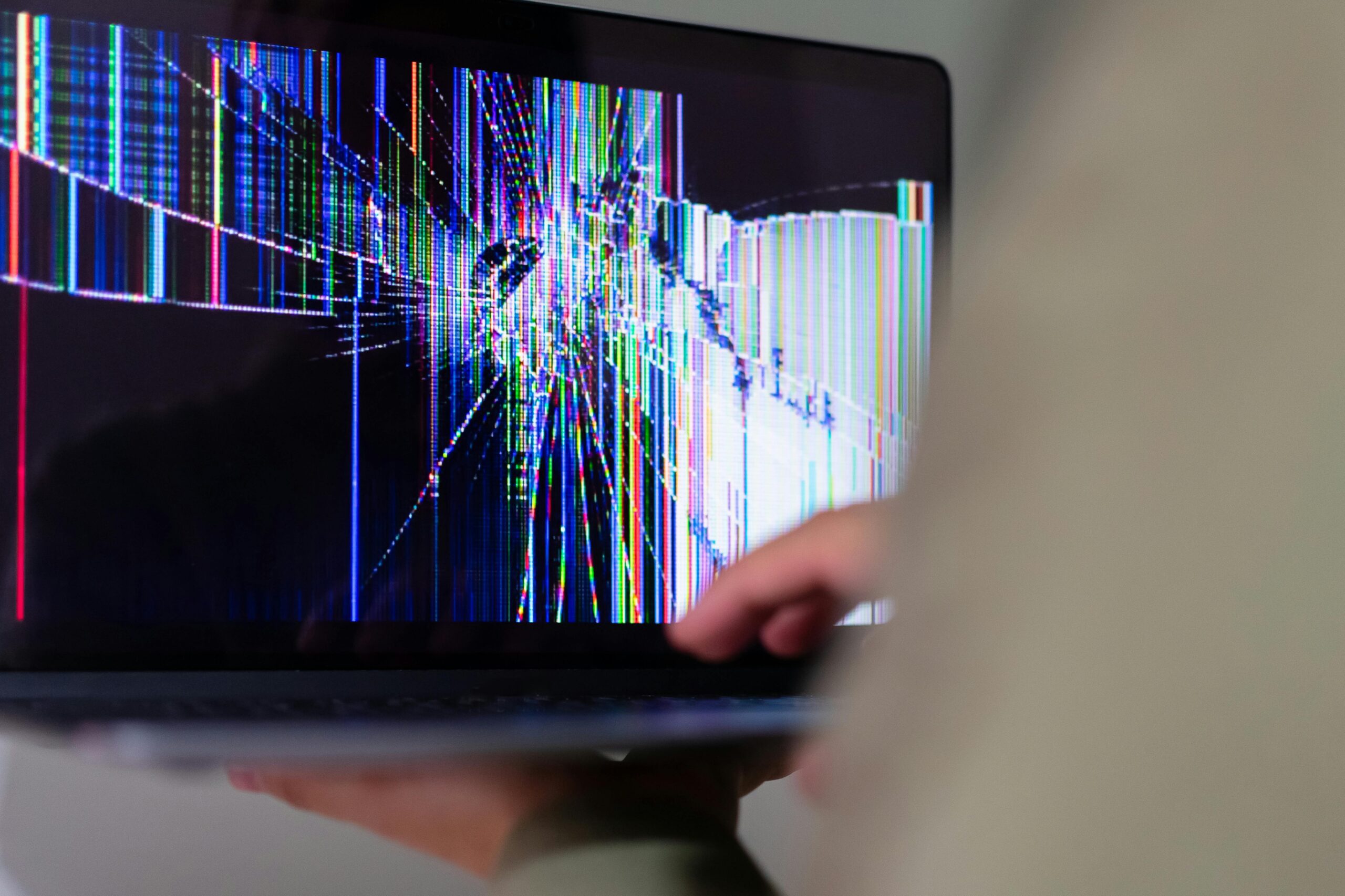
4 Types of Laptop Screen Damage We Repair Daily
Type 1: Hairline Cracks (Early Stage)
What it looks like: Single line across screen, minimal branching
Symptoms: Minor visual distraction, no cable damage yet
Can you use it? Short term, with care. Do not press on the crack or keep closing the lid, because hairline cracks spread.
Cost: SGD $150-180 | Time: 60-90 minutes
Type 2: Spiderweb Cracks (Most Common – 60% of repairs)
What it looks like: Multiple branching lines radiating from impact point
Symptoms: Visible distortion, possible backlight flickering
Can you use it? Risky – glass fragments may fall into keyboard
Cost: SGD $180-250 | Time: 90-120 minutes
Type 3: Shattered + Backlight Failure (Severe)
What it looks like: Extensive shattering, screen is dark or has dark spots
Symptoms: Screen is completely non-functional or partially black
Can you use it? Not safely – sharp edges, internal damage risk
Cost: SGD $250-350 | Time: 120-150 minutes
Type 4: Cable Damage / Flickering Screen (Hidden Damage)
What it looks like: Screen appears intact but shows flickering, lines, or no display
Symptoms: No visible crack but screen doesn’t work properly. Often caused by a damaged flex cable connecting the screen to the motherboard.
Cost: SGD $350-500+ | Time: 150+ minutes
All repairs include genuine OEM parts, labor, and a 90-day warranty.
Laptop Screen Repair Prices Singapore
Screen repair costs range from $150 to $700 depending on your brand, panel technology, and model. Full breakdown below so you know what to expect before walking in. The exact price is confirmed after a free diagnosis, before any work starts.
Price by Screen Technology
| Screen Type | Price Range | Common Models |
|---|---|---|
| Standard IPS LCD | $150–$250 | HP Pavilion, Asus VivoBook, Acer Aspire |
| Full HD IPS | $200–$350 | Dell Inspiron, Lenovo IdeaPad 5 |
| 4K UHD | $400–$600 | Dell XPS 15, Asus ProArt |
| OLED | $450–$700 | Dell XPS 13, Asus ZenBook, Lenovo Yoga 9i |
| Touch-enabled (add-on) | +$100–$200 | HP Spectre x360, Lenovo Yoga, Surface Pro |
| High refresh rate (144Hz+) | $350–$550 | Asus ROG, Lenovo Legion, HP Omen |
Laptop Screen Repair by Brand
Choose your brand for model-specific screen repair details:

Using a MacBook? See our MacBook screen repair page for Retina and Liquid Retina displays. Using an Aftershock gaming laptop? See Aftershock screen repair for 144Hz and 165Hz panels.
Brand-Specific Screen Vulnerabilities
After repairing 3,500+ laptop screens, we’ve identified how different brands fail:
MacBook Air/Pro: Thin glass + poor cable routing = 90% involve hidden flex cable damage. Early repair prevents costly escalation.
Dell XPS: Premium LCD screens are expensive—early repair saves $250+ vs delayed repair costs.
HP Pavilion/Envy: Budget screens are fragile—spiderweb cracks 60% more common than single-line cracks.
Asus VivoBook/ZenBook: Thin bezels = limited cable space—cable damage occurs 50% faster than other brands.
Lenovo ThinkPad: Durable design means rare failures, but when they occur, they’re severe.
Acer Aspire/Predator: Mid-range pricing means mid-range cable protection—standard repair time applies.
Where to Repair a Laptop Screen in Singapore
BreakFixNow has four outlets across Singapore. Walk in without an appointment, or WhatsApp your laptop model first so we can confirm the screen is in stock at the outlet nearest you.
| Outlet | Address | Hours | Tel |
|---|---|---|---|
| Bugis (Queen St) Nearest MRT: Bugis | Bugis Village, Cheng Yan Place #01-106 (beside DBS ATM), S188541 | 11am – 9pm daily | 9750 4333 |
| Marine Parade Nearest MRT: Marine Parade | Parkway Parade #B1-46, 80 Marine Parade Road, S449269 | 11am – 9pm daily | 9750 4333 |
| Jurong East Nearest MRT: Jurong East | Westgate #03-K2 (outside Singtel), 3 Gateway Drive, S608532 | 12pm – 8pm daily | 9150 8229 |
| Ang Mo Kio Nearest MRT: Ang Mo Kio | Ang Mo Kio Central, Blk 703 Ang Mo Kio Ave 8 #01-2533 (opposite MaxiCash), S560703 | 11am – 9pm daily | 9678 0203 |
How to Tell What’s Wrong With Your Laptop Screen
Before paying for a new screen, these free tests take under two minutes and usually show which part has failed. A cracked, flickering or black screen can be the panel, the backlight, the flex cable or the graphics chip, and each is a different repair. We confirm the result during the free diagnosis.
Cracked Screen: Is It the Glass or the Panel?
Shine a torch at the crack. If the image behind it looks normal, only the top layer is broken, which is rare on laptops because most have no separate glass. If the image is distorted or dark ink-like patches are spreading, the LCD panel itself is cracked. A cracked panel cannot be repaired, only replaced. Do not press on it or clean it with liquid, which seeps through the crack.
Flickering Screen: The Angle Test and Task Manager Test
Angle test: slowly open and close the lid through its full range. If the screen flickering gets worse, stops or shifts at certain angles, the flex cable is cracking at the hinge. This is the most common cause on laptops over two years old, and the fix is the cable rather than the panel.
Task Manager test: press Ctrl + Shift + Esc. If Task Manager flickers too, the cause is a driver or software conflict, not hardware. Common culprits are an outdated graphics driver, iCloud for Windows and Norton Antivirus. If Task Manager stays steady while the rest of the screen flickers, the fault is hardware.
Black Screen but the Laptop Is Running
Fans spin and lights glow, but the display shows nothing. Two tests narrow down a black screen:
- External monitor test: connect a TV or monitor by HDMI. If it shows the desktop, the fault is in the laptop’s screen, backlight or flex cable. If the external display is blank too, it is a graphics chip or motherboard fault, not the screen.
- Torch test: in a dark room, shine a bright torch at the screen at an angle. If you can faintly see the desktop, the panel works and only the backlight has failed.
Coloured Lines or Stripes on the Screen
Connect an external monitor. If the lines appear there too, it is a graphics fault. If the external display is clean, the fault is on the screen side: lines that move when you tilt the lid point to the flex cable, and lines that stay put point to a damaged panel.
Dead Pixels or a Dark Spreading Patch
A single dead pixel is cosmetic, and most manufacturers will not replace a screen for a handful of them. A dark patch that appears after a drop, or a cluster of dead pixels that grows over days, means the panel is damaged inside and will keep spreading until it is replaced.
Screen Too Dim or Brightness Not Working
Check software first: Windows Settings, then System, then Display, then Brightness. Turn off Night Light and battery saver, and cover the light sensor beside the webcam to see if the screen is auto-dimming. If those are fine, a dying backlight is the usual cause. On OLED laptops, dim or discoloured areas can be burn-in from static content, which needs a new OLED panel.
Laptop Screen Cracked by Itself? Why It Happens
Many customers tell us their laptop screen cracked by itself. It was fine when they closed the lid and cracked when they opened it. Laptop panels are very thin and have almost no tolerance for pressure or twisting, so a crack can appear without any drop. These are the usual causes:
- Something left on the keyboard. Earbuds, a pen, a USB receiver or a thick webcam cover gets trapped when the lid closes. This is the most common cause, and the crack usually starts exactly where the object sat.
- Pressure in a bag. A charger, water bottle or books pressing against the lid in a packed backpack can crack the panel without marking the lid.
- Opening or lifting by one corner. Opening the lid from a corner, or carrying the laptop by its screen, twists the panel. Thin-bezel laptops are especially prone to this.
- A stiff or broken hinge. A hinge that has become tight or broken away from its mount stresses the bottom corner of the screen every time the lid moves. If your crack starts near a hinge, the hinge needs fixing too or the new screen will crack the same way. See our laptop hinge repair service.
Is it covered by warranty? Usually not. Manufacturers treat a cracked panel as physical damage even when there was no drop, unless you bought accidental damage protection.
Does a Cracked Laptop Screen Need Replacing?
A damaged LCD or OLED panel is never repaired, it is replaced. What can be repaired are the parts around it. The fault decides which one you need:
- New screen needed: cracked LCD or OLED panel, spreading dark patch, lines caused by panel damage, failed backlight, OLED burn-in.
- Fixable without a new screen: flickering or lines that change with the lid angle (flex cable replacement), flickering that also affects Task Manager (driver or software fix), brightness problems caused by settings.
- Not a screen fault at all: a black screen or lines that also show on an external monitor point to the graphics chip or motherboard.
Does It Matter If My Laptop Has LCD or OLED?
Yes, for both cost and diagnosis. OLED panels cost more to replace than LCD (see the price table above). OLED screens also have no backlight, so a black OLED screen is never a backlight fault. Most budget and mid-range laptops such as the HP Pavilion, Lenovo IdeaPad, Asus VivoBook and Acer Aspire use IPS LCD. Premium models such as the Asus ZenBook OLED, some Dell XPS models and the Samsung Galaxy Book use OLED.
DIY vs Professional Laptop Screen Replacement
DIY Risks
- Voiding manufacturer warranty
- Damaging internal flex cables during disassembly
- Installing an incompatible panel
- No warranty on the repair
- Modern ultrabooks require specialised tools
Professional Benefits
- Expert diagnosis before ordering parts
- 90-day warranty on parts and labour
- Proper tools and ESD-safe handling
- Most repairs done in 1–2 hours
- Free re-diagnosis if issue recurs within warranty
Repair or Buy a New Laptop?
Repair if: under 4 years old, decent CPU (i5/Ryzen 5 or better), screen is the only issue. Buy new if: 5+ years old, multiple failures, or repair cost exceeds 60% of the laptop’s current value. We offer a free diagnosis to help you decide.
Why Repair Your Laptop Screen at BreakFixNow
✓ Free diagnosis – We assess damage and provide fixed, transparent pricing
✓ Genuine OEM screens – Authentic parts for maximum clarity and durability
✓ Expert technicians – 10+ years experience in Apple, Dell, and HP-certified repairs
✓ Speed – Most screen replacements in 1-2 hours
✓ Warranty – 90-day coverage on all screen repairs
✓ Collection service – Pick-up and delivery available island-wide for SGD $30
Customer Reviews
⭐⭐⭐⭐⭐ “BreakFixNow replaced my MacBook Pro screen in just an hour. Perfect quality and great service!” – Jason L.
⭐⭐⭐⭐⭐ “My Dell XPS had flickering issues, fixed the same day. Highly recommend!” – Sarah T.
We have 4.8★ on Google Reviews with thousands of satisfied customers across Singapore.
Other Laptop Repair Services:
Laptop Motherboard Repair | Keyboard Repair | Battery Replacement | SSD Replacement | Hinge Repair | Fan Repair | All Laptop Repair Services
Laptop Screen Repair FAQs
Ready to Fix Your Laptop Screen?
Free diagnosis • From $150 • Same-day service • 90-day warranty
WhatsApp NowTable of Contents
- Laptop Screen Repair for Cracked, Flickering and Black Screens
- 4 Types of Laptop Screen Damage We Repair Daily
- Laptop Screen Repair Prices Singapore
- Laptop Screen Repair by Brand
- Where to Repair a Laptop Screen in Singapore
- How to Tell What’s Wrong With Your Laptop Screen
- Laptop Screen Cracked by Itself? Why It Happens
- Does a Cracked Laptop Screen Need Replacing?
- DIY vs Professional Laptop Screen Replacement
- Repair or Buy a New Laptop?
- Why Repair Your Laptop Screen at BreakFixNow
- Laptop Screen Repair FAQs