
Laptop Cleaning Singapore
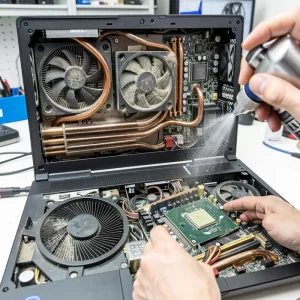
Laptop cleaning service. Your laptop is fully dismantled and cleaned of dust, particularly the fan and heatsink. The fan is also checked and load-tested. Takes about 30 to 60 minutes.
✓ All brands covered ✓ From $40 ✓ 30–60 min service ✓ Free diagnosis ✓ 90-day warranty
← Back to Laptop Overheating Repair
Why Laptop Cleaning Matters in Singapore
Most laptop cooling systems are designed for 20 to 22°C. As the ambient temperature in Singapore is typically 28 to 33°C and fairly humid, dust tends to build up quite densely between the fins of the heatsink. After as little as 1 to 2 years this will significantly impede air flow, resulting in noisy fans and high temperatures.
Having the inside cleaned on a routine basis is the most economical measure to ensure quiet operation and maximum performance. However, if your laptop is already shutting down or very hot, you should read our laptop overheating repair page so we can check every cause.
Signs Your Laptop Needs Cleaning
| Symptom | What It Means | Urgency |
|---|---|---|
| Noisier than normal (assuming no roughness) | Restricted air flow over the heatsink, so the fan runs faster | 🟡 Soon |
| Dust showing at the air intakes and exhausts | Probably a considerable amount deposited inside | 🟡 Soon |
| Higher temperatures than it used to run | Insufficient air flow to remove waste heat from the heatsink | 🟡 Soon |
| 1 to 2 years or more since last cleaned | Given the climate, it would be prudent to have it cleaned | 🟢 Schedule |
| Rough-running fan, shutdowns due to temperature | Other faults likely. See our pages on fan replacement and laptop overheating | 🔴 Immediate |
What Our Laptop Cleaning Service Includes
Blowing air into various air intakes will not adequately clean the internal components, and will generally force more dust in. All internal parts relating to cooling would be cleaned:
- Free diagnosis – existing temperatures recorded for CPU and GPU, as a baseline figure for the before-and-after difference.
- Full disassembly – laptop taken apart as appropriate for each model, taking care not to break any of the numerous plastic latches, and not to damage any cables, hinges, etc.
- Heatsink and fan cleaning – all possible dust blown out of the heatsink fins and fan blades with compressed air and brushed out with small brushes. This is where most of the improvement comes from.
- Fan inspection – examine fan for any signs of a bad bearing, and if so, provide a price for a fan replacement before doing anything else.
- Reassembly and stress test – re-assemble and load test to ensure satisfactory operating temperatures.
Add a Thermal Repaste?
For most machines over 2 years old it would be beneficial to also replace the dry thermal paste on the CPU and other components. We charge $40 in total, including the clean.
Thermal Paste Application →
PTM7950 Phase-Change Pad (5+ year lifespan, from $55) →
Liquid Metal (expert-only, from $80) →
Laptop Cleaning Price
| Service | Includes | Price |
|---|---|---|
| Laptop Internal Cleaning | Full disassembly, dust removal, fan inspection and a stress test | From $40 |
| Cleaning + Thermal Repaste | As above, with the addition of a repaste | From $40 |
| Fan Replacement | Replacement of a faulty fan, plus clean and repaste | From $60 |
All diagnostics are at no charge, and all prices quoted would be firm.
How Often Should You Clean Your Laptop in Singapore?
Ideally every 12 to 18 months, due to the hot humid conditions, more often than the 2–3 years often suggested overseas. Every 12 months would be better for a high-performance machine such as a gaming laptop, if there is a lot of dust or carpeting at home or office, or if it is frequently operated on soft surfaces such as beds or sofas.
Laptop Brands We Clean
- HP Pavilion, Spectre, Omen, EliteBook
- Dell and Alienware, all series
- Lenovo ThinkPad, IdeaPad, Legion, Yoga
- Asus ZenBook, VivoBook, TUF, ROG
- Acer Aspire, Swift, Nitro, Predator
- MacBook Air and Pro, Intel and M series
- Microsoft Surface Pro, Laptop and Book
- Aftershock, Schenker, and any others
Laptop Cleaning – FAQ
How much does laptop cleaning cost in Singapore?
From $40, including replacing thermal paste. No charge to diagnose existing problem.
How long does a laptop cleaning take?
Generally 30 to 60 minutes, possibly up to about 90 minutes for some MacBooks and high-performance gaming laptops.
Is laptop cleaning the same as laptop servicing?
Ours is a full internal service: the laptop is dismantled and all dust cleaned away. Other service houses may only blow compressed air around the various intakes, which doesn’t remove the dust inside.
Will cleaning stop my laptop running hot?
In the majority of cases, as dust is the most common cause. Otherwise most likely due to hardening of thermal paste, so we would recommend a repaste. There are a number of other possible reasons though, as outlined under laptop overheating repair.
Can you clean a MacBook?
Yes. All MacBook Air and Pro models, whether Intel or Apple Silicon (M1 to M4).
Does cleaning void my warranty?
May do so, depending on whether warranty seals are broken. Otherwise irrelevant for out-of-warranty laptops, and all our repairs are warranted for 90 days.
Related: Laptop Overheating Repair • Laptop Fan Repair • Thermal Paste Application • Apply PTM7950 • Apply Liquid Metal • Desktop PC Cleaning
Due for a Clean? Walk In Today.
Free diagnosis • From $40 • 30–60 min service • All brands • 90-day warranty
WhatsApp Now