
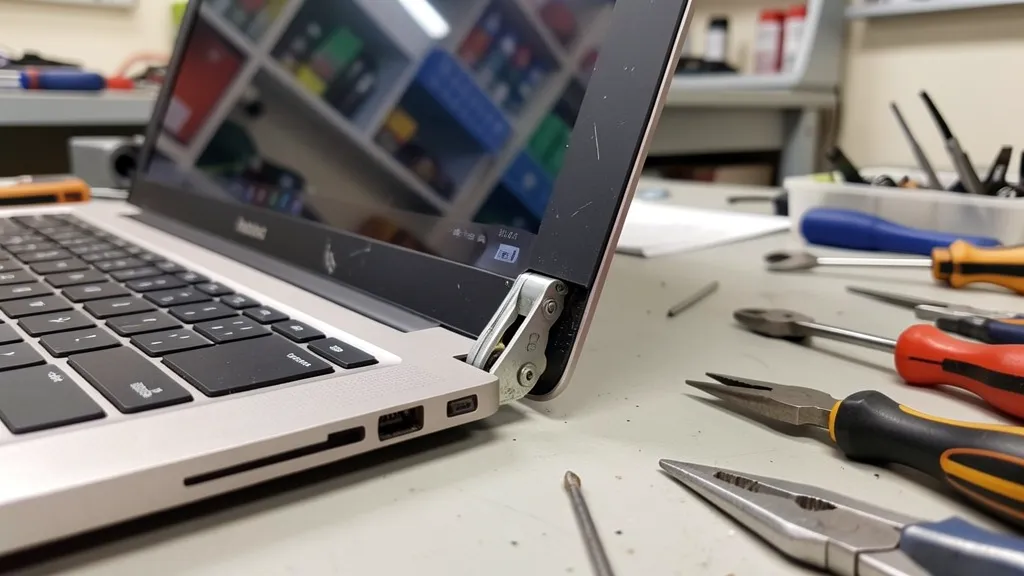
Your laptop screen keeps falling backward. Or it slowly tilts forward during use. Maybe it won’t hold any position at all and collapses shut the moment you let go. This is one of the most frustrating laptop problems—and one of the most fixable.
At BreakFixNow, we’ve diagnosed hundreds of “screen won’t stay open” cases. Before you pay $150-$300 for professional hinge repair, try these 5 fixes that solve the problem 40% of the time.
Quick Diagnosis: What’s Actually Wrong?
Test your hinge to identify the problem:
Close your laptop completely
Slowly open to 90 degrees (perpendicular to desk)
Release the screen
What happens?
✓ Screen falls backward: Hinge too loose
✓ Screen falls forward/closes: Hinge too loose OR damaged friction mechanism
✓ Screen stays but wobbles: Loose screws OR stripped screw holes
✓ Screen requires extra force to move: Hinge too tight (will eventually break mounts)
✓ Clicking/cracking sounds: Damaged plastic mounts OR worn friction mechanism
Understanding which problem you have determines which fix will work.
Fix #1: Tighten the Hinge Screws (Success Rate: 25%)
Problem it solves: Minor wobbling, slight loosenessTime required: 10-15 minutesDifficulty: EasyTools needed: Small Phillips screwdriver (usually #0 or #00)
How to Do It:
Step 1: Power off laptop and unplug itStep 2: Locate hinge screws:
Most laptops: Screws visible on bottom of laptop base (corners)
Some models: Screws under rubber feet or stickers
Dell/HP: Often accessible from keyboard bezel area
Lenovo ThinkPad: Usually require bottom cover removal
Step 3: Tighten each screw 1/4 turn clockwiseStep 4: Test screen movementStep 5: If still loose, tighten another 1/4 turn
Warning: Don’t over-tighten. If screws won’t turn easily, STOP—you risk stripping the threads.
When this works: Early-stage looseness where screws have simply vibrated loose over time.
When this won’t work: Stripped screw holes, damaged hinge mechanism, cracked plastic mounts.
Fix #2: Remove & Reinstall Hinges with Threadlocker (Success Rate: 35%)
Problem it solves: Screws keep loosening, moderate wobblingTime required: 30-45 minutesDifficulty: MediumTools needed: Screwdriver set, medium-strength threadlocker (Loctite Blue 243)
How to Do It:
Step 1: Remove all hinge screws completelyStep 2: Clean screw threads with isopropyl alcoholStep 3: Apply 1 small drop of threadlocker to each screw threadStep 4: Reinstall screws, tightening to firm resistance (don’t overtighten)Step 5: Wait 24 hours for threadlocker to cure before using laptop
Why this works: Threadlocker prevents screws from vibrating loose while still allowing future removal if needed. It’s not permanent glue—it’s removable with normal tools.
When this works: Chronic screw loosening, laptops that keep developing wobble after tightening.
When this won’t work: Stripped screw holes (threads are gone), damaged hinge mechanism.
Where to buy threadlocker: Hardware stores, online ($8-$15 for small bottle)
Fix #3: Adjust Hinge Tension (Success Rate: 20%)
Problem it solves: Hinge too loose (screen falls) OR too tight (excessive opening force)Time required: 45-60 minutesDifficulty: Medium-HardTools needed: Screwdrivers, plastic spudgers, needle-nose pliers
Warning: This requires partial laptop disassembly. Only attempt if comfortable with electronics repair. Consult your laptop’s service manual or iFixit’s laptop repair guides for detailed disassembly instructions.
How to Adjust Hinge Tension:
For Loose Hinges:
Remove bottom cover to access hinge mechanism
Locate the hinge barrel (cylindrical metal part)
Look for a small bolt/nut at the hinge pivot point
Use pliers to tighten 1/4 turn clockwise
Test, repeat if needed
Reassemble
For Overly-Tight Hinges:
Access hinge mechanism (same as above)
Locate tension bolt
Loosen 1/4 turn counter-clockwise
Test, repeat if needed
Reassemble
When this works: Hinge mechanism itself has lost/gained tension, but mounting points and screws are intact.
When this won’t work: Worn friction washers, stripped mounting holes, cracked plastic.
Fix #4: Add Friction with Electrical Tape (Success Rate: 15%)
Problem it solves: Mildly loose hinge, temporary fixTime required: 20 minutesDifficulty: Easy-MediumTools needed: Electrical tape, scissors
This is a temporary solution—not a permanent fix.
How to Do It:
Step 1: Power off and open laptop to 90 degreesStep 2: Identify where hinge connects to laptop baseStep 3: Wrap 2-3 layers of electrical tape around hinge barrel (the metal cylinder)Step 4: Smooth tape down firmlyStep 5: Close and open laptop to testStep 6: Add more tape if needed for additional friction
Why this works: Increases diameter of hinge slightly, creating more friction against the housing.
When this works: Mild looseness where hinge mechanism is worn but not broken.
When this won’t work: Severe looseness, stripped screws, cracked mounts.
How long it lasts: 2-6 weeks. This buys time until you can get professional repair.
Fix #5: Clean & Lubricate Stiff Hinges (Success Rate: 30%)
Problem it solves: Hinge too stiff, requires excessive force to openTime required: 30-40 minutesDifficulty: MediumTools needed: WD-40 or silicone lubricant, cotton swabs, isopropyl alcohol
Note: This prevents future breakage from excessive stiffness.
How to Do It:
Step 1: Open laptop to 90 degreesStep 2: Locate hinge pivot points (where metal cylinder enters casing)Step 3: Clean around hinge with isopropyl alcohol on cotton swabStep 4: Apply WD-40 to hinge pivot (small amount, don’t flood)Step 5: Open and close laptop 10-15 times to work lubricant inStep 6: Wipe away excess lubricantStep 7: Test opening force—should feel smooth, not stiff
Why this works: Removes built-up dust/debris and lubricates friction points, reducing stress on plastic mounts.
When this works: Stiffness from lack of lubrication or debris buildup (common in dusty environments).
When this won’t work: Hinge mechanism itself is damaged or over-tightened from factory.
Prevention: Repeat every 6-12 months in dusty environments (especially relevant in Singapore’s climate).
When DIY Won’t Work: Signs You Need Professional Repair
Stop and seek professional help if you see:
🚫 Visible cracks in plastic casing around hinge area
🚫 Screws spinning without tightening (stripped threads)
🚫 Plastic pieces separating from laptop body
🚫 Screen cable exposed or damaged
🚫 Metal hinge visibly bent or broken
🚫 Display flickering when adjusting screen angle
🚫 Laptop won’t power on after hinge movement
Why these can’t be DIY-fixed:
Stripped screw holes require metal inserts
Cracked plastic needs structural epoxy reinforcement or replacement
Broken hinges need replacement parts
Cable damage requires disassembly and precision soldering
Attempting DIY on these will: Make the repair more expensive and potentially damage other components.
What Professional Hinge Repair Involves
If DIY doesn’t work, here’s what a proper repair entails:
For Stripped Screw Holes:
Drill out damaged plastic threads
Install metal threaded inserts (brass or steel)
Provides 3x stronger hold than original plastic
For Cracked Plastic Mounts:
Apply industrial-grade epoxy to cracks
Add reinforcement backing plates
Structural rebuild that’s stronger than original
For Broken Hinge Mechanism:
Replace worn/broken hinge assembly
Install new friction washers
Adjust tension for proper operation
For Display Cable Damage:
Carefully route new cable through hinge area
Solder connections (if needed)
Test display functionality
Professional repair cost: $80-$250 depending on damage extent and laptop model.
Brand-Specific Hinge Issues
Different laptop brands have characteristic hinge problems:
Asus (ZenBook, VivoBook, TUF):
Problem: Overly-stiff hinges crack plastic mounts
DIY success rate: Low (usually requires mount rebuild)
Read more: Asus Laptop Hinge Repair
Dell (XPS, Latitude, Inspiron):
Problem: Metal hinges stress corner mounts
DIY success rate: Medium (tension adjustment can help)
Read more: Dell Laptop Hinge Repair
HP (Pavilion, Envy, Spectre):
Problem: Weak screw posts strip easily
DIY success rate: Low (usually need metal inserts)
Read more: HP Hinge Repair
Lenovo (ThinkPad, IdeaPad):
Problem: ThinkPad too stiff, IdeaPad too loose
DIY success rate: Medium (tension adjustment often works on ThinkPads)
Read more: Lenovo Hinge Repair
Acer (Aspire, Nitro, Predator):
Problem: Budget plastic can’t handle normal use
DIY success rate: Low-Medium
Read more: Acer Hinge Repair
Prevention: How to Avoid Hinge Problems
Proper Opening Technique:
✅ Open from center of screen (not corners)
✅ Support base with other hand
✅ Lift smoothly (no jerky movements)
✅ Don’t over-extend screen angle
Handling Best Practices:
✅ Close lid when moving laptop
✅ Don’t carry laptop by screen
✅ Avoid adjusting angle frequently
✅ Use laptop stand to reduce open/close cycles
Environmental Protection:
✅ Keep laptop cool (heat makes plastic brittle—important in Singapore)
✅ Avoid direct sunlight (UV degrades plastic)
✅ Clean dust regularly (prevents hinge stiffness)
Early Intervention:
✅ Address minor looseness immediately ($40-$60 tightening vs $150+ rebuild)
✅ Lubricate stiff hinges before they crack mounts
✅ Get professional assessment at first sign of problems
Repair or Replace Decision
Repair Your Laptop If:
✓ Laptop less than 4 years old
✓ Good specs (8GB+ RAM, SSD, recent CPU)
✓ Only hinge issue (everything else works fine)
✓ Professional repair quote under $200
Consider Replacement If:
✗ Multiple hardware failures
✗ 5+ years old with outdated specs
✗ Second hinge failure
✗ Repair cost exceeds 40% of replacement cost
✗ Battery, screen, keyboard also need replacement
For most 2020+ laptops, hinge repair is more economical than replacement. According to Consumer Reports, single-issue repairs on laptops less than 4 years old are typically cost-effective.
Frequently Asked Questions
Can I fix a loose laptop hinge myself?
Yes, for minor looseness caused by vibrated screws. Simply tighten the hinge screws 1/4 turn at a time. Success rate is about 25%. However, stripped screw holes, cracked plastic, or damaged hinge mechanisms require professional repair.
How much does professional hinge repair cost?
Professional laptop hinge repair typically costs $80-$250 depending on the extent of damage and laptop model. Simple screw tightening costs $40-$60, while full hinge replacement with mount reinforcement costs $150-$250.
Why does my laptop screen keep falling backward?
Your laptop screen falls backward because the hinge has become too loose, either from worn friction washers, loosened screws, or a damaged hinge mechanism. Try tightening the hinge screws first. If that doesn’t work, the hinge mechanism needs professional adjustment or replacement.
Is it safe to use my laptop with a broken hinge?
Using a laptop with a broken hinge can cause further damage to the display cable, screen panel, and laptop casing. The constant stress can crack plastic mounts and eventually damage internal components. Get it repaired as soon as possible to prevent more expensive repairs.
How long does hinge repair take?
Simple hinge tightening takes 3-5 hours. Full hinge replacement with reinforcement takes 4-6 hours. Most repairs are completed same-day with no appointment needed at BreakFixNow.
Take Action Now
Don’t let a loose hinge damage your laptop further. Try these DIY fixes first, but if the problem persists or you see signs of serious damage, get professional help immediately.
For laptop owners in Singapore, BreakFixNow delivers expert hinge repairs with same-day service. Our technicians diagnose problems accurately and use reinforced techniques that make repairs stronger than original.
🔧 Related Repair Services
Need help with laptop hinge issues? Check out these resources:
Asus Hinge Repair – Complete Asus hinge repair service
Dell Hinge Repair – Dell-specific hinge repairs
HP Hinge Repair – HP hinge problem solutions
Lenovo Hinge Repair – Lenovo hinge repair services
Need Professional Hinge Repair in Singapore?
📞 WhatsApp: +65 9750 4333
⏰ Service Hours: Monday-Saturday, 10 AM – 8 PM
📍 Islandwide Service: Convenient locations across Singapore
✅ Free Diagnostic • ✅ No Fix No Pay • ✅ 90-Day Warranty