
Surface Pro Screen Repair
Fast and reliable Microsoft Surface Pro screen repair in Singapore — expert replacement across all Pro generations at affordable prices with warranty coverage.
Microsoft
← Back to Laptop Screen Repair
Surface Pro Screen Repair – BreakFixNow
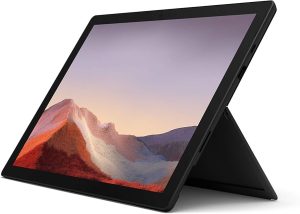
The screen of all models of Surface Pro is quite unlike that found in most other laptops. It comprises display, touch digitiser and an outer layer of glass, all bonded together, which is then stuck to the body. As such, it can be quite difficult to replace the screen. BreakFixNow are experienced at replacing these on all versions of Surface Pro, in addition to other models such as Surface Laptop, Laptop Studio, Book, and Go.
Surface Pro Screen Issues — By Generation
Each generation will have differences, including in type and amount of adhesive and routing of various cables to and from the display panel. Using an incorrect screen is likely to lead to incompatibility.
Surface Pro 4, 5, and 6
The adhesive on all of these will generally be very solid after the effects of time and heating when in use. They all feature 2736×1824 PixelSense displays. Screens are relatively cheap to source for any of Pro 4, 5 or 6. It is important to apply adequate heat to all areas of the screen, and take time when separating, not to crack the surrounding frame.
Surface Pro 7 and 7+
Pro 7 includes USB-C port and Pro 7+ has 11th gen Intel processors. The type of screen and bonded assembly (2736×1824 PixelSense) is identical. Adhesive tends to be more uniform on these than on Pro 4 and 5. Cables route as per previous models.
Surface Pro 8, 9 Intel, and Pro X
A new body design was introduced for Pro 8, accommodating a taller 13″ 2880×1920 120Hz screen. The Pro 9 Intel model has the identical screen. The Pro X uses the same display size, with an Arm processor. Again, the adhesive is fairly uniform around all edges of the screen, but the 120Hz screen will be greater in cost.
Signs Your Surface Pro Screen Needs Replacing
✓ Various degrees of cracking to glass
✓ Black screen with the machine switched on
✓ Total loss of touch function or areas of no response
✓ Discoloured and darkened areas, typically radiating outwards from area of damage
✓ Lines and areas of intermittent display
✓ Cracked glass but all areas of touch responsive
All of these require replacement of the entire display assembly.
⚠️ Surface Pro owners: It is not possible to remove only one element such as the outer glass, even if undamaged areas of screen and touch function remain intact, so any damage requires replacement of the entire assembly. There is not an option to replace only the glass.
Our Surface Pro Screen Repair Process
It takes around 2–3 hours to change a Surface Pro screen, longer than most laptops.
1. Identify model number: to source correct replacement screen, as there is significant variation, particularly between Pro 7 and 8 models.
2. Apply heat: to all areas sufficiently to melt adhesive underneath screen. Too quick and it is easy to damage surrounding frame.
3. Remove screen: carefully lever up screen in places using suction and thin picking tools, removing as much of old adhesive as possible from body.
4. Attach and check new screen: check responsiveness all over screen and for evenness and quality of colour.
5. Stuck down with adhesive and thoroughly checked: for any faults over all areas of display and screen response.
Assembly Sourcing and Generation Matching
All screens are specific to each model number. It is essential to know which exact model it is prior to obtaining a replacement, as, for example, Pro 7 and 8 are very different, although superficially similar.
Why Heat Separation Takes Time
A thick line of adhesive is run around the entire perimeter of the screen. If this is not sufficiently melted, on lifting it can readily cause damage to surrounding frame, snap cables, and so on. Therefore it is important to leave a length of time for all areas to heat thoroughly, adding to total job time (typically 2–3 hours compared with 1–2 hours to change most other laptop screens).
Pro 8 and Pro 9 Intel Share the Same Assembly
The Pro 8 and Pro 9 Intel both have a 2880×1920 120Hz PixelSense display. As far as we are aware, this is physically identical in the Pro 9 Arm (SQ3) model. A similar but separate assembly is available for Pro X. In all cases, it is important to establish model number from the serial before obtaining a replacement.
Surface Pro Screen Repair Pricing
From $250. This reflects cost of the display bonded assembly plus additional time required to apply heat. As mentioned above, there is greater cost for Pro 8, 9 and Pro X displays. Exact price quote would depend on model.
See also: Surface Pro Hinge Repair • Surface Pro Keyboard Repair • Surface Laptop Repair • Laptop Screen Repair
Surface Pro Screen Repair – FAQ
How much does Surface Pro screen repair cost in Singapore?
From $250, with Pro 6–7 being the cheapest to replace. It would be more expensive for any of Pro 8, 9, Pro X. Exact quote on identification of model.
Can you replace just the glass on a Surface Pro?
No. All elements, that is glass, touch, screen, are stuck together, and it is only available as one complete unit. So any amount of damage requires the complete unit to be replaced.
My Surface Pro touch still works but the glass is cracked — does it need replacing?
Yes, it would be advisable. Further cracking can be expected at any time with subsequent loss of function of some areas of touch and display.
How long does Surface Pro screen repair take?
Typically 2–3 hours to complete due to time required heating the whole area of adhesive.
Do you cover Surface Pro 8 and Pro 9 screen repair?
Yes. All models can be repaired, including Pro 8, 9 Intel, 9 Arm and Pro X. Note Pro 8 and 9 Intel use identical 2880×1920 120Hz screen.
Official Microsoft Support (Singapore): 800 852 2088 • support.microsoft.com