
Laptop SSD Upgrade
Affordable SSD replacement services for laptops in Singapore. Upgrade your SSD storage with fast, reliable SSD replacements to boost your laptop’s performance and speed.
✓ All brands covered ✓ From $120 ✓ Data migration available ✓ 90-day warranty ✓ Same-day service
Affordable Laptop SSD Upgrade Service in Singapore – BreakFixNow
Your laptop’s performance is heavily reliant on its storage drive. A slow or failing SSD causes frustrating delays, crashes, and sluggish boot times. At BreakFixNow, we specialize in fast, affordable, and high-quality SSD replacement services for all major laptop brands.
NVMe vs SATA — Which SSD Does Your Laptop Use?
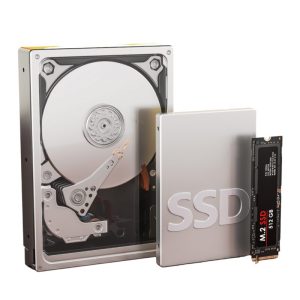
Modern laptops use either NVMe or SATA SSDs — they are not interchangeable. NVMe drives (M.2 form factor) are significantly faster and found in most laptops made after 2018. SATA SSDs use the older 2.5″ form factor and are common in older or budget machines. We identify the correct type for your model before ordering parts.
Laptop SSD Replacement Services
Dell Laptop SSD Replacement: Improve your Dell laptop’s speed with a fast and reliable SSD upgrade.
HP Laptop SSD Replacement: Boost your HP laptop’s performance with a quick SSD upgrade.
Apple MacBook SSD Replacement: Upgrade your MacBook’s storage and performance with top-quality SSD.
Acer Laptop SSD Replacement: Enhance your device’s speed and storage capacity.
Lenovo Laptop SSD Replacement: Optimize your Lenovo laptop’s performance with an expert SSD upgrade.
Top-Quality SSDs: We use reliable SSDs from Samsung, Crucial, Kingston, and Western Digital.
Affordable Rates: Get the best value without exceeding your budget.
Quick Service: SSD replacements completed swiftly with data migration available.
Other Laptop Repair Services: Motherboard Repair | Screen Repair | Keyboard Repair | Battery Replacement | Hinge Repair | Fan Repair
Laptop SSD Upgrade – FAQ | BreakFixNow Singapore
How long does the SSD upgrade take?
Typically 1–2 hours including data transfer and system optimization.
NVMe or SATA — what’s the difference?
NVMe SSDs use the M.2 slot and are significantly faster than SATA SSDs. Most laptops made after 2018 use NVMe. We identify the right type for your model before proceeding.
Will my data be lost during the SSD upgrade?
We offer data migration services to transfer your data from your old drive to the new SSD. We always recommend backing up your data before the upgrade.
What size SSD should I choose?
For basic tasks, 240GB or 500GB is sufficient. For video editing or gaming, we recommend 1TB or larger.
How much does an SSD upgrade cost?
Prices typically start from $120 depending on the SSD size and model. We provide a free diagnostic and detailed quote before proceeding.
Do you offer warranty after the SSD upgrade?
Yes, all SSD upgrades come with a 90-day warranty on parts and labor.
Ready to Upgrade Your Laptop SSD?
Free diagnosis • From $120 • Data migration • 90-day warranty
WhatsApp Now