
NAS Repair & Data Recovery Singapore – Synology, QNAP, UGREEN
Unable to connect to your NAS? Your information may still be intact regardless of whether there’s a faulty drive, RAID failure, lost data, unsuccessful firmware flash or the NAS will not power up. Based in Singapore, BreakFixNow can assist you with all the major NAS brands. If we are unable to recover your data, you will pay $0.
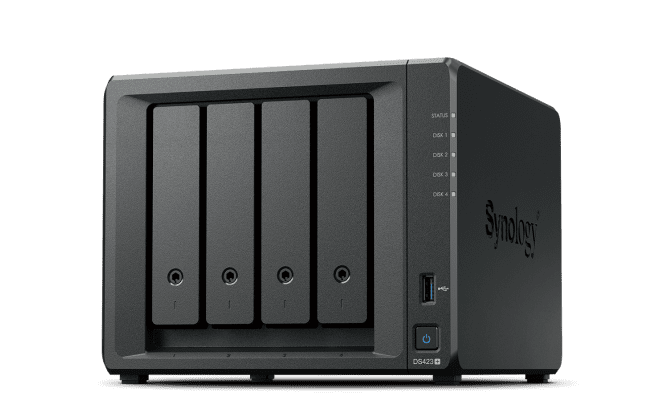
NAS Data Recovery — What We Fix
NAS devices will typically result in significant data loss upon failure. This may range from just one faulty disk within a Synology NAS, to a completely failed RAID set from another brand (e.g. QNAP), inadvertent data deletion, or a non-responsive NAS device. Our engineers are experienced with the following: Synology, QNAP, UGREEN, WD, Asustor, Buffalo, Netgear ReadyNAS and Seagate, covering all common RAID levels.
Estimated NAS Repair Pricing
| NAS Size | Example Models | Estimate (SGD) |
|---|---|---|
| 2-Bay NAS | Synology DS224+, DS223j QNAP TS-233, TS-264 UGREEN NASync DXP2800 | $300+ |
| 4-Bay NAS | Synology DS423+, DS923+ QNAP TS-433, TS-464 UGREEN NASync DXP4800, DXP4800 Plus | $600+ |
Estimates only. The final price is confirmed after we inspect your NAS. See the full price list below.
NAS Repair for Businesses
We’ve handled NAS repairs and recoveries for numerous businesses, from small offices to larger teams that rely on a Synology, QNAP or UGREEN NAS for shared files, backups and client records. Once you bring in your NAS and accompanying drives, we can begin our process.
✓ NDA and confidentiality agreements on request
✓ Company invoices and purchase orders accepted
✓ Priority turnaround for urgent business cases
✓ We work from drive images, so your original drives are never written to
NAS Failure Scenarios We Recover From
🔴 Drive Failure / Degraded RAID
If one or more of your NAS disks has failed and caused the RAID to degrade or drop out, we are able to restore data from RAID 0, 1, 5, 6 and 10 for any of the NAS brands listed. This includes cases where a RAID 5 or 6 array has lost more drives than its redundancy allows. Please note that commencing a RAID reconstruction can destroy potentially retrievable data, so reach out to us first.
🗑️ Accidental Deletion
Files, directories or whole shares may have been lost due to human action, automated processes or a cyberattack such as ransomware. Cease writing to your NAS immediately and arrange to have it brought in to us, as continued data writes will compromise the likelihood of retrieving your files. We can recover deleted files from Synology (Btrfs, ext4), QNAP (QTS, QuTS hero) and WD My Cloud NAS.
⚠️ Failed DSM / QTS Update
Perhaps you attempted to upgrade your Synology DSM or QNAP QTS and the process did not finish correctly? You may find yourself unable to log in or see the UI, or your NAS continuously cycles between powering up and down, displaying an orange LED. In most instances, data can be retrieved despite the OS being compromised. We will extract your data from the drives first, and subsequently resolve the issue to allow the NAS to resume normal operation.
💀 Physical Damage / Dead NAS
The NAS is showing no sign of life. The root cause could be anything from a defective PSU, a power spike, electronic component(s) failure or mechanical damage. Regardless, in most circumstances the attached disks will still be operational. We will image and examine each disk, and recover the relevant share. With Synology and QNAP, we can sometimes fit the drives into a compatible chassis and bypass the need to perform a full data recovery.
NAS Brands We Recover From
- ✓ Synology — DiskStation DS series, RackStation RS series, all DSM versions (ext4 and Btrfs)
- ✓ QNAP — TS series, TVS series, QTS and QuTS Hero (ZFS and ext4)
- ✓ Western Digital (WD) — My Cloud Home, My Cloud EX2/EX4, PR series
- ✓ Asustor — Lockerstor, Drivestor, Flashstor series
- ✓ Netgear ReadyNAS — All ReadyNAS models
- ✓ Buffalo — LinkStation, TeraStation series
- ✓ Seagate — BlackArmor NAS units
Our NAS Recovery Process
- Diagnosis: Please ensure you bring the complete NAS and all connected drives. We will establish the cause of the failure, assess the health of the individual disks and the state of your share(s), and provide a costing prior to any intervention.
- Drive Health Assessment: All drives will be assessed via SMART, surface and firmware tests to ascertain which are healthy and which need imaging.
- Volume Extraction: Having determined the appropriate RAID setup, we will mount the share in a ‘read only’ fashion. If the NAS is completely dead, we read directly from the drives.
- Data Recovery: Data will be copied to our secure environment and verified. In the event of deletions, we will probe the shares to identify what (if any) information can be salvaged.
- Verification & Handover: Finally, we will allow you to inspect your restored files and close the job, while advising on how to minimise the risk of recurrence.
⚠️ Important: Should your NAS experience a failure, switch it off! Do not perform a RAID reconstruct or re-create the share, nor apply DSM or QTS repair tools, as these can overwrite recoverable data. Power it down and bring it to BreakFixNow.
RAID Recovery
If the share(s) cannot be accessed due to RAID, we will construct the RAID from the cloned images of the source disks, ensuring no data is altered. Please visit our RAID Recovery page → if the failed RAID resides outside a NAS device (e.g. servers, desktops or external enclosures).
NAS Recovery Pricing
| Service | Starting Price (SGD) |
|---|---|
| NAS Data Recovery (logical) | From $300 |
| NAS Data Recovery (physical) | From $400 |
| RAID Array Recovery | See RAID Recovery page |
| DSM / QTS Reinstallation (data preserved) | From $80 |
| NAS Setup & Configuration (new unit) | From $80 |
| Drive Migration to Replacement NAS | From $120 |
*Final pricing depends on drive count, RAID level, and extent of damage. Full quote provided after diagnosis. No data, no fee applies to data recovery jobs.
NAS Setup, Repair & Other Services
- NAS Setup & Configuration — Drive installation, RAID creation, user accounts, shared folders, remote access (QuickConnect, Tailscale, WireGuard), and automated backup setup.
- DSM / QTS Update & Migration — Firmware upgrades and full NAS migration to new hardware.
- Hardware Repair — PSU replacement, fan repair, network port faults, and drive bay issues.
- Backup Solution Design — Hyper Backup, Active Backup, rsync, and Time Machine configuration to protect your data going forward.
Related Services:
RAID Recovery | Laptop Repair | Motherboard Repair | SSD Upgrade | Graphics Card Repair
Replacing the NAS after recovery? Our Synology vs QNAP comparison covers which suits home and small office use in Singapore.
NAS Data Recovery — FAQ | BreakFixNow Singapore
My Synology NAS shows a degraded volume — can you recover my data?
Yes. If an array loses one drive, it will continue to run but is no longer protected. Switch the NAS off to prevent any additional drive(s) failing and bring it in. Once here, we will assess the individual drives and replace any faulty ones, allowing us to rebuild the volume with your data intact.
My NAS won’t turn on at all. Is my data still recoverable?
Generally speaking, yes. Provided the NAS has failed as a result of a failing PSU, mains event or mainboard, there should be no data loss on the attached drives. We will extract and test these, then access the volume. In many instances, with Synology and QNAP, we will be able to import the drives into an appropriate alternative NAS and resume normal operation.
A DSM update on my Synology failed and now it’s stuck in a boot loop. Is my data safe?
In virtually all cases. The corruption caused by a failed DSM upgrade will only affect the DSM installation. Your data volumes will be unaffected. We will therefore copy all data from the NAS and perform a fresh DSM install. Do not attempt to restore DSM to the NAS until we have extracted your data.
I accidentally deleted a shared folder on my QNAP. Can it be recovered?
It may be possible, however the sooner you can switch off the NAS and refrain from generating any new data or indexing the volume, the better. Bring it in as is. The chances of successfully recovering the deleted file(s) decrease the more data is written to the affected drive(s) after deletion.
What RAID levels can you recover from?
RAID 0, 1, 5, 6, 10 and Synology SHR. Where multiple drives fail in a RAID 5 or 6 configuration such that the remaining drives are unable to provide sufficient parity, recovery is often still possible. See our RAID Recovery page for full details.
Do you charge if you can’t recover my data?
No. If we are unsuccessful in recovering your data, our service is free of charge.
Can you come on-site to recover my NAS data?
Unfortunately not. You will need to supply the NAS and associated drives to our premises for assessment.
My NAS was hit by ransomware. Can you recover the files?
Dependent on the type of ransomware attack and the existence of prior volumes. If your Synology Btrfs or QNAP QuTS hero volume is configured to create snapshots, these may still be available following the incident. Again, please supply the affected NAS for evaluation and we can advise prior to providing an estimate.
Table of Contents