
LAPTOP CLEANING SINGAPORE
Professional internal laptop cleaning service in Singapore. Full disassembly, dust removal, fan inspection and stress test. Restores cooling performance in 30–60 minutes.
✓ All brands covered ✓ From $40 ✓ 30–60 min service ✓ Free diagnosis ✓ 90-day warranty
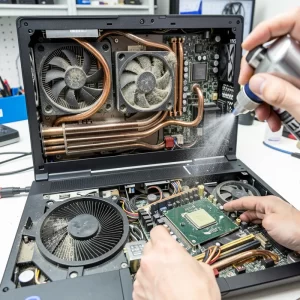
Why Laptop Cleaning Matters in Singapore
Singapore’s tropical climate — high humidity, year-round heat, and fine dust — is uniquely harsh on laptop cooling systems. Most laptop thermal designs assume an ambient temperature of 20–22°C. Singapore sits at 28–33°C year-round, giving your cooling system far less headroom from the moment you turn it on.
The result: dust packs into heatsink fins faster, fans run harder, and cooling performance drops significantly within 1–2 years of use without professional cleaning. A laptop that ran quietly and cool when new will start throttling, overheating, and shutting down without regular maintenance.
Signs Your Laptop Needs Cleaning
| Symptom | What It Means | Urgency |
|---|---|---|
| Fan louder than usual | Dust blocking airflow, fan working harder | 🟡 Soon |
| Laptop hot to touch | Heat not being dissipated effectively | 🟡 Soon |
| Slows down under load | Thermal throttling — CPU reducing speed to cool down | 🟡 Soon |
| Random shutdowns | Thermal protection triggering to prevent damage | 🔴 Immediate |
| Visible dust at vents | Significant internal buildup likely | 🟡 Soon |
| 1–2+ years since last clean | Preventive service due for Singapore users | 🟢 Schedule |
What Our Laptop Cleaning Service Includes
A can of compressed air sprayed into the vents is not a cleaning service. It dislodges dust into the chassis without removing it. Our full internal clean addresses every component of the cooling system:
- Free diagnosis — We check CPU and GPU temperatures before starting so you can see the before/after difference.
- Full disassembly — We open the laptop properly, following model-specific procedures to avoid damaging clips, hinges, or ribbon cables.
- Heatsink fin cleaning — Compressed air and fine brushes remove all packed dust from heatsink fins and fan blades. This is where the biggest temperature gains come from.
- Fan inspection — Fan bearing condition is checked. If the fan is failing, we’ll quote a fan replacement separately before proceeding.
- Full reassembly and stress test — We run a CPU/GPU load test after reassembly to verify temperatures are back in the normal range before returning your laptop.
Also Need Thermal Paste Replacement?
Thermal Paste Replacement Service
Dried thermal paste is the second most common cause of laptop overheating after dust buildup. If your laptop was last serviced more than 2 years ago, a thermal repaste is likely needed alongside the clean. We offer this as a combined or standalone service.
Thermal Paste Application →
PTM7950 Phase-Change Pad (5+ yr lifespan, from $55) →
Liquid Metal (10–30°C drop, expert-only, from $80) →
Pricing
| Service | Includes | Price |
|---|---|---|
| Laptop Internal Cleaning | Full disassembly, dust removal, fan inspection, stress test | From $40 |
| Cleaning + Thermal Repaste | All above + thermal paste replacement | From $60 |
| Cleaning + Repaste + Fan Replacement | All above + fan swap if bearing is failing | From $120 |
Free diagnosis is always included — we confirm what your laptop needs and give you a fixed quote before any work begins. No surprise charges.
How Often Should You Clean Your Laptop in Singapore?
We recommend a full internal clean every 12–18 months for Singapore users — more frequently than the 2–3 year schedule often cited overseas. Singapore’s humidity and heat accelerate dust accumulation significantly. If you use your laptop on soft surfaces or in air-conditioned offices where dust is recirculated, annual cleaning is strongly recommended. Gaming and high-performance laptops benefit from cleaning every 12 months.
Laptop Brands We Service
- HP (Pavilion, Spectre, Omen, EliteBook)
- Dell & Alienware (all series)
- Lenovo (ThinkPad, IdeaPad, Legion, Yoga)
- Asus (ZenBook, VivoBook, TUF, ROG)
- Acer (Aspire, Swift, Nitro, Predator)
- Apple MacBook (Air, Pro — all Intel and M-chip models)
- Microsoft Surface (Pro, Laptop, Book)
- Aftershock, Schenker, and all other brands
Laptop Cleaning — FAQ
How long does a laptop cleaning take?
Most laptops are cleaned and returned within 30–60 minutes. More complex models (particularly MacBooks and gaming laptops) may take up to 90 minutes.
Is laptop cleaning the same as laptop servicing?
At BreakFixNow, our cleaning service is a full internal service — disassembly and complete dust removal. Some shops only spray compressed air through the vents, which does not remove internal dust.
Will cleaning fix my overheating laptop?
In most cases, yes. Dust buildup is the most common cause of overheating in laptops used in Singapore for more than a year. If temperatures remain high after cleaning, dried thermal paste is usually the next culprit — see our thermal paste replacement service.
Can you clean a MacBook?
Yes. We service all MacBook models — Air and Pro, both Intel and Apple Silicon (M1, M2, M3, M4).
Does cleaning void my warranty?
Opening a laptop can void the manufacturer’s warranty if warranty seals are broken. For out-of-warranty laptops, this is not a concern — and we provide our own 90-day warranty on all work performed.
My laptop was cleaned elsewhere but still overheats. Why?
The most common reason is that the heatsink fins were not fully cleared. A compressed air spray through the vents pushes dust further into the chassis rather than removing it. Our service includes full disassembly and complete dust extraction.
Other Services: Fan Repair • Thermal Paste Replacement • Apply Liquid Metal • Apply PTM7950 • Screen Repair • Battery Replacement • Desktop PC Cleaning
Laptop Running Hot? Fix It Today.
Free diagnosis • From $40 • 30–60 min service • All brands • 90-day warranty
WhatsApp Now